

-
Added to comparison 
-
Added to comparison
-
Added to comparison 

-
Added to comparison
-
Added to comparison 
-
Added to comparison
-
Added to comparison
-
Added to comparison
-
Added to comparison 
-
Added to comparison
-
Added to comparison 
-
Added to comparison
-
Added to comparison 
-
Added to comparison 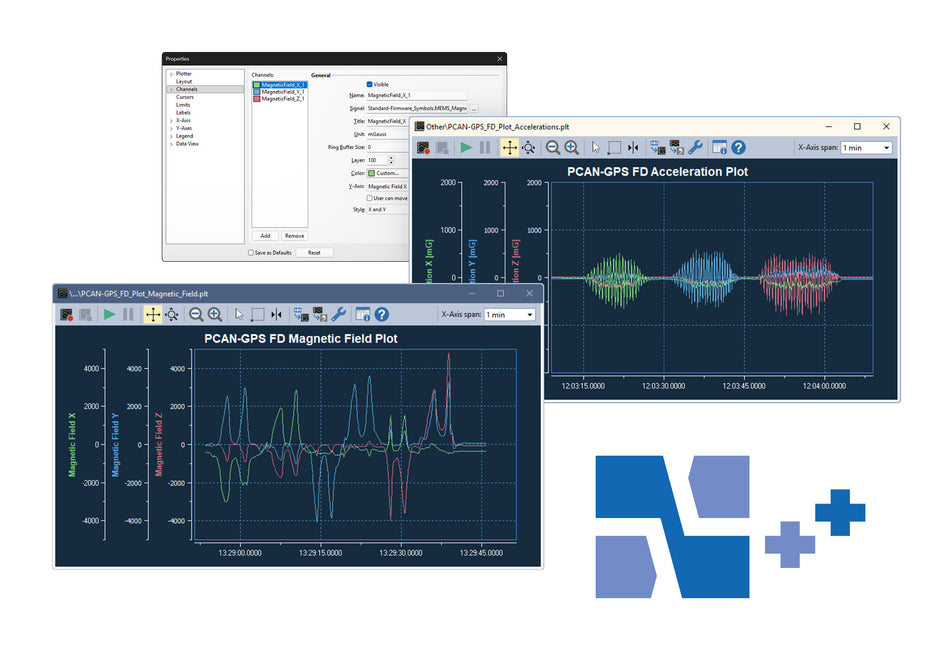
-
Added to comparison 
-
Added to comparison

-
Added to comparison
-
Added to comparison 
-
Added to comparison
-
Added to comparison
-
Added to comparison
-
Added to comparison
-
Added to comparison
PEAK SYSTEM TECHNIK PCAN EXPLORER 7 SOFTWARE
NEWEST PCAN EXPLORER SOFTWARE
PCAN-Explorer 7 is a comprehensive, professional software for working with CAN-CC (Classic), CAN-FD and CAN-XL buses.
One of the most important features of PEAK’s all-new PCAN-Explorer 7 is the introduction of the floating license option. While all previous versions of the popular PCAN-Explorer software family—reaching back more than 20 years—offered single-user/machine license options (and more recently, a portable variant using a USB dongle.
The new floating license allows for maximum flexibility within engineering teams which applies to everyone from a small group of a few users to large corporations with hundreds of individuals using this powerful software for their CAN/CAN FD (and now CAN XL) diagnostic and development tasks.
PCAN-Explorer 7 uses the established CodeMeter licensing tool along with a license server; this new option allows for the seamless management and assignment of available seats to each user within a group.
To set up the license server, a user must download and install the CodeMeter Runtime provided by Wibu, which is available for Windows, Linux, and macOS. Activation of new PCAN-Explorer 7 licenses is now handled via ticket numbers assigned to each user upon delivery of the software.
By connecting to one or more CAN buses, users gain access to a wide range of options for monitoring CAN traffic, individual messages or specific data signals. By sending messages manually or periodically, the bus can be directly influenced, for example for control purposes or for simulations.
A central point in the use of the program is the symbolic representation of CAN messages. Using symbol files from the PEAK system or compatible third-party databases, the program translates the hexadecimal CAN IDs and payload data into a readable and easy-to-understand format.
The trace function allows the data traffic of several buses to be recorded and replayed at the same time. For a more in-depth analysis, playback can be step-by-step or with breakpoints. Incoming CAN messages and recordings can be filtered based on various criteria.
Special requirements as well as the automation of complex processes can be implemented with simple macros, advanced scripts in Python or VBScript and with callback functions. For this purpose, the entire PCAN Explorer 7 object model can be accessed via Python or VBScript.
In addition, the functionality of the PCAN Explorer can be extended. PEAK-System offers add-ins that expand the possibilities for presenting and editing data, add compatibility with third-party data definitions such as CANdb or ARXML, and even provide support for standards such as J1939.
Available as a 30-day trial. Request your copy here.
WHY CAN XL?
CAN XL (Extended Data-Field Length) was created with the aim of improving cooperation with Automotive Ethernet and enabling the transmission of larger data streams for use cases such as flashing ECUs. In addition, the new standard offers the transmission of up to 2048 bytes of payload data per message and data bit rates of up to 20 Mbit/s.
FEATURES
- Management of all settings, information, and files in projects
- Exporting entire projects including linked files to handy packets for archiving or sharing
- Integrated text editor with syntax highlighting for creating and editing of Symbol files, macros, and scripts
- Quick search for elements and commands of the PCAN-Explorer
- Definition of keyboard shortcuts per project for commands, macros, and for setting signal values
- User interface language can be switched (German/English)
- Functionality upgrades with optional add-ins
- Improved performance due to 64-bit foundation and separate processing of communication and user interface
CONNECTION TO CAN CC / CAN FD / CAN XL
- Connection with up to 64 buses, independent of their CAN specification
- Simultaneous connections with multiple CAN interfaces independent of their hardware type
- Support for the CAN specifications CAN CC (classic CAN 2.0), CAN FD, and CAN XL (ISO 11898-1:2024)
- Support for CAN XL operation modes:
- CAN XL with error signaling
- CAN XL without error signaling
- CAN XL with transceiver mode switch
- Bit rate configuration:
- CAN bit rates (nominal) up to 1 Mbit/s
- CAN FD data bit rates up to 8 Mbit/s
- CAN XL data bit rates up to 8 Mbit/s, CAN FD compatible transmission mode
- CAN XL data bit rates up to 20 Mbit/s by using the transceiver mode switch
- Optional use of custom bit rates with automatic calculation of register values
- Listen-only mode can be activated for each connection
- Clear overview of connections with their bit rate, status, error counter, and bus load
- Function to execute a hardware reset of the CAN interface
RECEPTION & TRANSMISSION
- Display of CAN traffic in sortable receive and transmit lists with various information like ID, length, data, time-outs, message count, and cycle time
- Separate column configuration for CAN, CAN XL, and J1939 in Receive/Transmit and Trace windows
- Highlighting of data changes on incoming CAN messages in Receive and Watch windows, applies to raw values and symbolic representation
- Error frame indication can be activated for each connection
- Display of connections, receive, transmit, and error states
- Message reception with a maximum resolution of 1 µs
- Manual and periodic transmission of messages with a maximum resolution of 1 ms
- Creating CAN XL send messages with selection of an SDT (service data unit type) according to CiA® 611-1, such as tunneling of CAN FD frames
- Transmission of CAN messages in response to remote frames (only with CAN CC)
- Messages can be grouped as transmit lists, stored and loaded as desired, e.g., in order to emulate CAN nodes
RECORDING
- Trace function for logging of CAN data traffic, optionally along with errors
- Operation of multiple tracers for different CAN channels at the same time
- Recording directly to files or to RAM (in linear, dynamic, or circular buffer mode)
- Saving of the logged data as readable TRC text files or CSV files
- Conversion of saved recordings to third-party file formats like MDF4 and ASC with the free PEAK-Converter
- Representation of the logged messages with details such as time stamp, type, ID, length, and data bytes
- Representation of the data bytes in hexadecimal, decimal, or ASCII format
- Subsequent examination of the logged data with the help of Symbol files
PLAYBACK
- Playback of CAN data traffic directly from files or from the buffer
- Operation of multiple playbacks to different CAN channels at the same time
- Optional playback with breakpoints or in single-step mode for in-depth analysis
- Playback of trace files with optional loop function
- Playback of a specified section of a recording
- Playback of third-party file formats like BLF and MDF4 by using the free file conversion tool PEAK-Converter
FILTERING
- Multiple flexible filters can be assigned to the Receive window or different traces
- Filters can be applied to running traces or subsequently to existing trace files
- Filters are composed of one or more items that are processed in sequence for each incoming message
- Filter types:
- CAN channel
- CAN ID range
- SJA 1000 Code/Mask
- CAN messages interpreted with Symbol files
- Options like: errors, protocol exceptions, and overload frames, RTR frames, events
- J1939-specific filter types: PGN, priority, source address, and destination address
- CAN XL-specific filter types: PID, VCID, SDT, RRS, SEC, AF, and AF mask
SYMBOLIC REPRESENTATION
- Clear and readable representation of CAN messages based on the Symbol format from PEAK-System:
- Easy allocation of CAN messages by assigning alphanumeric names to CAN IDs
- Bit-exact division of the data into signals for assigning names, data type, etc.
- Signals are used for data presentation and processing by add-ins such as Plotter and Instruments Panel
- User-friendly real-time monitoring of several signals via the Watch window
- Bus load available as a signal for each connection
- Comfortable Symbol file creation with the supplied Windows software PCAN-Symbol Editor or with the integrated text editor
- Application of multiple Symbol files or third-party data description files on a single CAN connection
- Direct application of third-party data description files (.dbc, .arxml) with the Bus Descriptions Add-in
AUTOMATION
- Automation of small tasks or complex processes with macros, VBScript, or Python, like:
- Test procedures for the implementation or development of CAN systems
- Send an e-mail if a temperature is exceeded
- Start an action when a particular message is received
- Open an Excel sheet when an event occurs and save the data in individual cells
- Calculate signal values from the data of incoming CAN messages
- Creation of macros and scripts with the integrated text editor
- Assignment of function keys to individual macros
- Access with VBScript or Python to almost all program elements via the PCAN-Explorer object model
- Processing of Python scripts with the included Embedded Python installation
- Automation with callback libraries
- Integration of self-implemented callback functions as native libraries (.dll, 64-bit)
- Freely programmable processing and modification of CAN message data and execution of message-related processes
- Calling of callback functions on events such as receipt, before transmission, and after transmission of a CAN message
SYSTEM REQUIREMENTS
- Windows® 11 (x64/ARM64), 10 (x64)
- For portable license: USB port for license dongle (available for USB-A and USB-C)
- For the CAN bus connection: PC CAN interface from PEAK-System, if required, with support for CAN FD or CAN XL
- Internet connection recommended for activation
LICENSING
- Based on Wibu CodeMeter, a versatile and secure licensing system (installed during PCAN-Explorer setup)
- Single user license either bound to a computer or to a portable USB license dongle by Wibu Systems
- Floating licenses, hosted on your own server
- All licenses are perpetual, software updates provided as part of the maintenance plan
-
Licenses include 12-month software maintenance, renewals optional
- Click her for more Information
- License management with the included PEAK License Manager
SCOPE OF SUPPLY
- Installations files for PCAN-Explorer, including Wibu CodeMeter
- License:
- Single user license for installation on a computer or an optional USB license dongle by Wibu Systems
- Upcoming in January 2026: Floating license hosted on customer server
- 12-month software maintenance included
- PCAN-Symbol Editor for Windows® Details ...
- Documentation in HTML format
UPGRADING FROM 6 to 7
Below shows the potential discounts on upgrades from Explorer 6 to 7. This includes add-ins as well.
Discount Savings % Chart:

UPGRADE PROCEDURE:
Upgrading from PE6 to PE7 for single machine licenses:
Customer provides current PE6 license ID, upgrade cost is calculated, once paid we send the new PE7 license via email, old PE6 license becomes invalid.
Upgrading from PE6 to PE7 for portable licenses (USB License Dongle):
Provide your PE6 license ID, we calculate the upgrade cost, then customer returns old PE6 USB licensed dongle, upon receipt at Phytools and once paid, we will email a new PE7 single user license and ship the NEW PEAK License Dongle to the customer. Any PE6 add-ins must also be upgraded.
For further information contact sales@phytools.com
Why upgrade to PCAN Explorer 7?
- Support for CAN XL: Full compatibility with the CAN XL specification, enabling analysis, simulation, and messaging with payloads up to 2048 bytes and data bit rates up to 20 Mbit/s.
- Enhanced Symbol File Management: Apply multiple symbol files per connection for greater flexibility when adding or managing devices on a network, eliminating the single-database limitation from previous versions.
- Unified Project System: Store all settings, configurations, and related files in projects, and export them as shareable project packages, making collaboration, archiving, and reuse easier.
- Modern Workflow Enhancements: Integrated text editor with syntax highlighting for symbol files, macros, and scripts; quick element search; customizable keyboard shortcuts; and multi-language UI support improve usability and efficiency.
- 64-Bit Architecture & Performance Boost: A native 64-bit foundation with separate processing paths for UI and communications delivers faster performance and better responsiveness, even with high-throughput CAN traffic.
- Expanded Trace & Playback Tools: Advanced trace logging with multiple tracers, flexible buffer options, readable export formats (CSV, text, etc.), and powerful playback controls, including multi-channel playback and loop/single-step functions.
- Flexible Filtering & Display: New, detailed filter types for CAN, CAN FD, and CAN XL traffic plus improved receive/transmit list views with highlighted data changes, error indicators, and configurable columns.
- AUTOSAR XML File Import: The CANdb Add-in is now the Bus Descriptors Add-in and adds support for AUTOSAR XML files.
PCAN-Explorer 7 License Options
- Bundled Licensing option: Choose the base software only or the "full bundle." This includes the base software and all available add-ins under a single license.
- Flexible License models: Choose a single-user license for a dedicated PC or USB dongle.
- Floating License: The new floating licenses for team environments, allows a defined number of concurrent users to share access across a network via a central license server.
Links:
PCAN EXPLORER 7: SINGLE USER LICENSE
PCAN Explorer 7 Add-ins include:
- Instrument Panel - add-in for signal display & manipulation
- Bus Descriptions - add-in for supporting CANdb & AUTOSAR XML formats
- Plotter - add-in for configurable display of signal curves
- J1939 - add-in for J1939 & J1939 FD support
PCAN-Explorer 7 Floating licenses:
- FLOATING LICENSE
- FLOATING LICENSE - Plotter Add-in 7
- FLOATING LICENSE - Instruments Panel Add-in 7
- FLOATING LICENSE - Bus Descriptions Add-in 7
- FLOATING LICENSE - J1939 Add-in 7
NOTE: AVAILABILITY & SUPPORT OF PCAN-EXPLORER 6
- PCAN-Explorer 6 will be supported until January 2027 (~ 1 year)
For this period, only security updates/bug fixing will be continued


